
An AI notetaker turns a meeting you sat through into a written record you can actually use, without you typing a word. It listens, transcribes, and then summarizes what happened, pulls out the decisions, and lists the action items. The promise is simple: stay present in the conversation instead of scribbling, and still walk away with clean notes. This guide explains how that works under the hood, the choices that matter when picking one, what these tools still get wrong, and the privacy rules you cannot skip.
What an AI notetaker actually does
Behind the friendly "it takes notes for you" pitch is a pipeline of four steps, and each one can introduce errors that carry into the next:
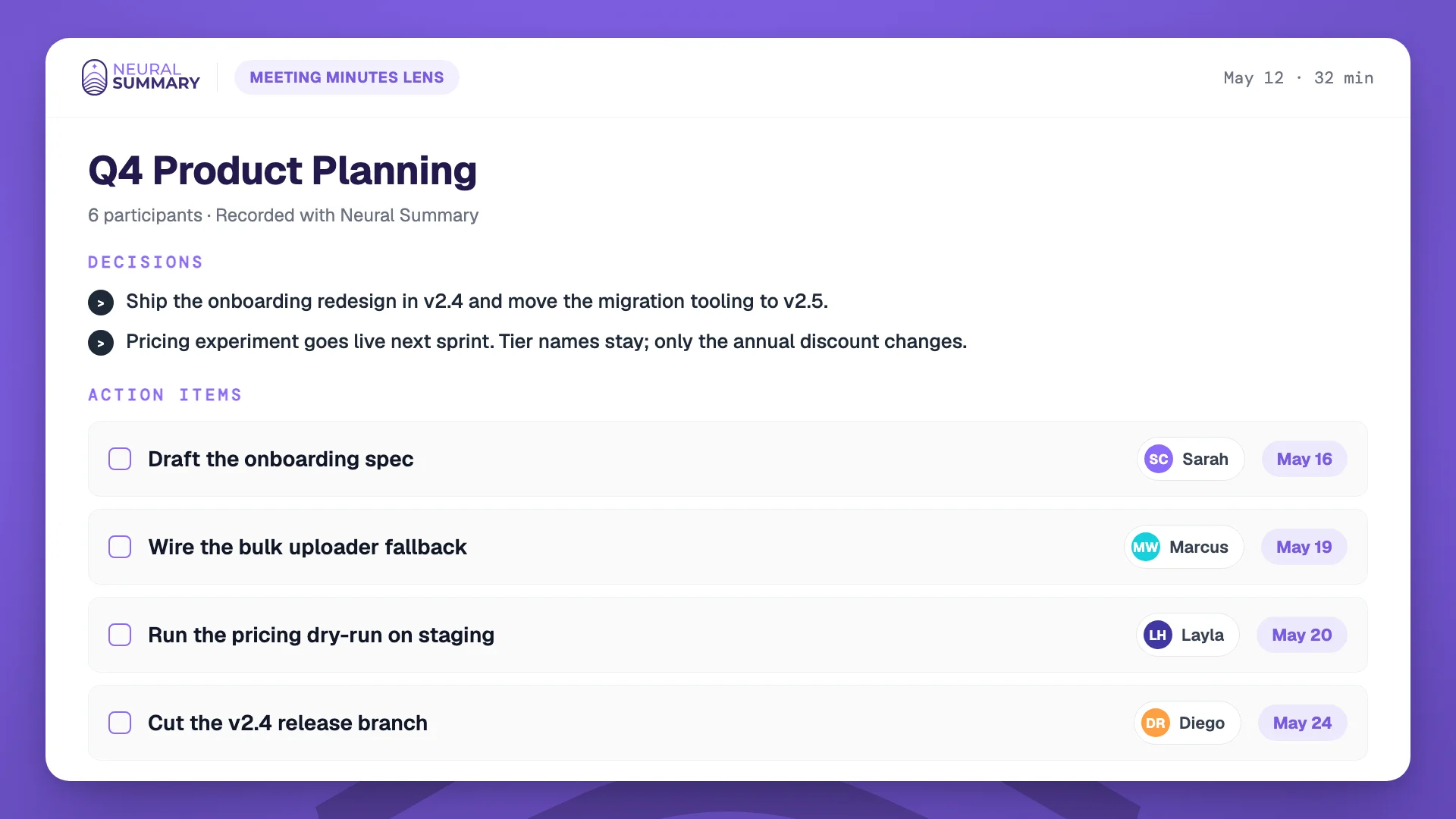
First it captures and cleans the audio. Then automatic speech recognition turns the audio into a transcript. Then speaker diarization works out who said what and labels the transcript. Finally a language model reads the transcript and produces the output you actually want: a summary, the key topics, the decisions, and action items, often with suggested owners and a draft follow-up.
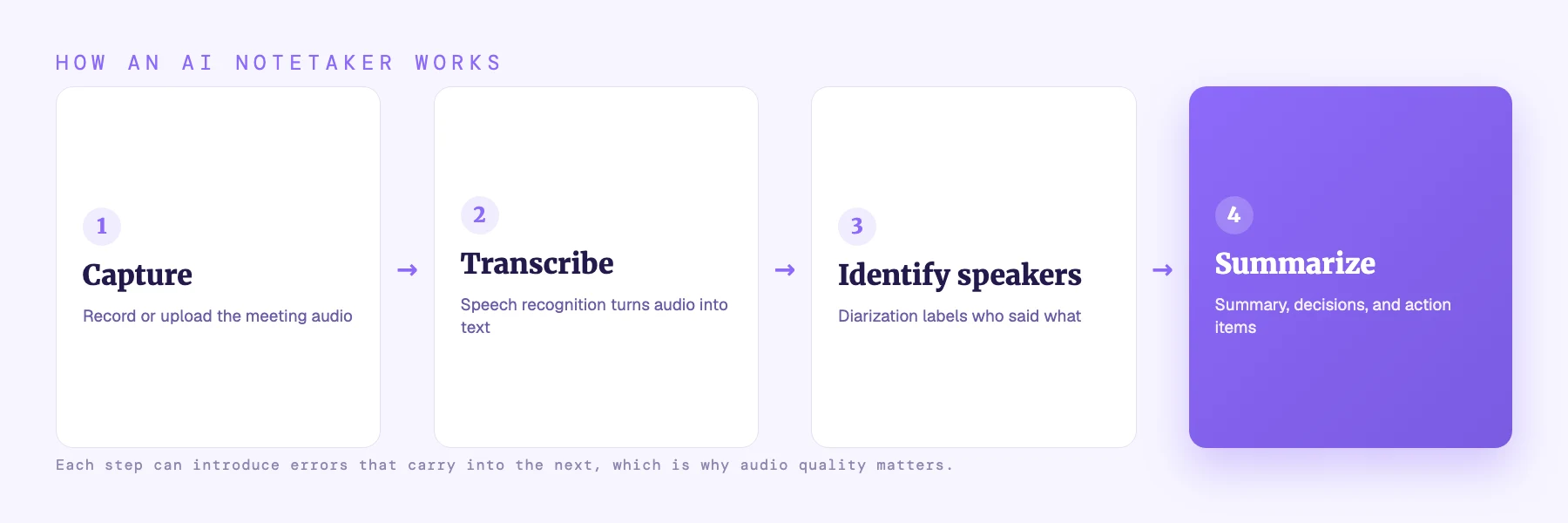
The first three steps are about getting an accurate transcript. The last step is where the value is, because it is the difference between a wall of text and a short list of what to do next. The best tools also let you search across past meetings and ask questions of them.
How they capture the meeting: bot or bot-free
There are two main ways an AI notetaker gets into your meeting, and the difference is more important than it first appears.
The bot model sends a virtual participant into the call. It shows up in the attendee list, captures audio directly from the platform, and usually gives clean per-speaker audio. The trade-off is that an unfamiliar bot in a client call raises the obvious question, "who is this and is this being recorded," and some platforms and organizations restrict or ban meeting bots outright.
The bot-free model records at the device level, or you simply upload audio you captured yourself. No extra participant appears, which keeps client calls clean and works for in-person conversations, phone calls, and any platform. The trade-off is that there is no automatic on-screen signal that recording is happening, so you have to disclose it yourself, which you should be doing anyway.
| Bot that joins | Bot-free / upload | |
|---|---|---|
| Extra participant in the call | Yes | No |
| Works for in-person and phone | No | Yes |
| Built-in "recording" signal | Yes | You disclose it yourself |
| Blocked on some platforms/calls | Sometimes | Rarely |
| Feels right for sensitive client calls | Often not | Usually yes |
Neither is universally better. Bots suit internal teams that want zero post-call admin; bot-free suits client-facing work and anywhere a stranger joining the call would be awkward.
What to look for
Most tools record, transcribe, and summarize. The real differences show up around the edges:
Capture method, as above: does a bot join, or can you record and upload without one. Speaker-identification quality, since misattributed speakers lead to action items assigned to the wrong person. Follow-through, meaning whether the notes actually go somewhere (a task tracker, a CRM, a doc) instead of dying in the tool. Cross-meeting search, so you can ask "what did we decide about pricing last month" across many conversations. And data handling: where recordings are stored and what controls you have. Treat vendor-published accuracy numbers with skepticism; they are marketing figures, not independent benchmarks.
If you want a hands-on comparison of specific tools by use case, we keep one in the best AI note-taking apps.
How to get great AI meeting notes
The quality of the notes is mostly decided before the AI ever runs, by the quality of the audio and the structure of the conversation:
Use good audio. Headsets and per-person microphones beat a single laptop in the middle of a conference table by a wide margin; on far-field room audio, error rates can more than triple. Encourage one person to speak at a time, because overlapping speech is the single hardest case for both transcription and speaker labels. Say decisions and action items out loud and explicitly ("so the decision is X; Alex will do Y by Friday"), because the model extracts commitments by recognizing that kind of language. Verify speaker labels when who-said-what matters. Disclose that you are recording. And always read the summary before you forward it.
The limits worth knowing
AI meeting notes are useful, not magic, and being honest about the failure modes is how you avoid getting burned.
Transcription accuracy is excellent on clean, read-aloud audio (often under 3 percent word error rate on benchmarks) but real meetings are messier: independent meeting benchmarks report around 12 percent error on close-talk audio and over 35 percent on a single far-field room mic. Speaker diarization adds its own error, typically in the low teens of a percent, and worsens during crosstalk.
The failure mode to watch most closely is hallucination: speech recognition can occasionally insert words or whole phrases nobody said. Controlled studies put this around 1 percent of segments, but researchers testing real-world field audio have reported much higher rates in specific datasets. The provider of one widely used open model explicitly advises against using it in high-stakes decision-making contexts without review. The practical implication is the same one as always: AI meeting notes are a strong first draft, not a system of record. Read them before you rely on them.
Privacy and consent
Recording a conversation is regulated, and the rules vary by location. In much of the world a participant can record a conversation they are part of, but some places require everyone's consent, and a few treat secret recording as a crime. Importantly, a visible bot in the call is not, by itself, legal consent; you still need to disclose and, where required, get agreement. There is also a live legal frontier around voiceprints and biometric data tied to speaker identification, which is worth watching if you operate in stricter jurisdictions.
The simple, safe habit is the same one we recommend everywhere: tell people you are recording. We cover the details, country by country, in is it legal to record a conversation.
From notes to action
The reason to use an AI notetaker is not to have a transcript. It is to make sure the meeting leads somewhere. The decisions get recorded, the action items get owners, and the work actually moves.
That is the whole idea behind Neural Summary: you record or upload a meeting, on any platform and with no bot required, and you get back a structured summary, the decisions, and action items you can act on, rather than a recording you never reopen. The notes are not the point. What happens because of them is.
The bottom line
An AI notetaker records, transcribes, identifies speakers, and summarizes a meeting into decisions and action items. Choose between a bot that joins and a bot-free tool based on how client-facing your meetings are. Get good audio and speak decisions out loud to get good notes. Expect a strong first draft, not a flawless record, and always read it. And whatever you use, disclose that you are recording.
Frequently asked questions
What is an AI notetaker?
An AI notetaker is software that captures a meeting's audio, transcribes it, identifies who spoke, and then produces a summary, the decisions, and action items automatically, so you can take part in the conversation instead of writing notes by hand.
Are AI meeting notes accurate?
On clean audio they are good, but real meetings introduce errors from background noise, crosstalk, accents, and shared microphones, and speech recognition can occasionally fabricate words. Treat AI meeting notes as a strong first draft and read them before relying on or sharing them.
Do AI notetakers have to join the call as a bot?
No. Some tools send a bot that appears as a participant; others record at the device level or let you upload audio you captured yourself, with no bot in the call. Bot-free tools work for in-person and phone conversations too, but you must disclose recording yourself.
Is it legal to use an AI notetaker in meetings?
It depends on where the participants are. Many places allow recording a conversation you are part of, but some require everyone's consent, and a bot in the call does not count as consent on its own. The safe practice everywhere is to announce that you are recording. See our recording-law guide for the country-by-country detail.
What is the difference between AI meeting notes and a transcript?
A transcript is the full word-for-word text of what was said. AI meeting notes go a step further, distilling that transcript into a short summary, the decisions made, and the action items with owners, so you get something you can act on instead of a long document to read.